除了处理word, excel等文件外,最为常见的就是PDF的导出了。在java技术栈中,PDF创建和操作最为常用的itext了,但是使用itext一定要了解其版本历史和License问题,在早前版本使用的是MPL和LGPL双许可协议,在5.x以上版本中使用的是AGPLv3(这个协议意味着,只有个人用途和开源的项目才能使用itext这个库,否则是需要收费的)。本文主要介绍通过SpringBoot集成itextpdf实现PDF导出功能。@anarkh
- SpringBoot集成文件 - 集成itextpdf之导出PDF
- 知识准备
- 什么是itext
- itext的历史版本和License问题
- 标准的itextpdf导出的步骤
- 实现案例
- Pom依赖
- 导出PDF
- 添加页眉页脚和水印
- 进一步理解
- 遇到license问题怎么办
- 为何添加页眉页脚和水印是通过PdfPageEvent来完成
- 示例源码
- 参考文章
知识准备
需要了解itext,以及itext历史版本变迁,以及license的问题。
什么是itext
来源于百度百科:iText是著名的开放源码的站点sourceforge一个项目(由Bruno Lowagie编写),是一个用Java和.NET语言写的库,用来创建和修改PDF文件。通过iText不仅可以生成PDF或rtf的文档,而且可以将XML、Html文件转化为PDF文件。 iText的安装非常方便,下载iText.jar文件后,只需要在系统的CLASSPATH中加入iText.jar的路径,在程序中就可以使用iText类库了。
iText提供除了基本的创建、修改PDF文件外的其他高级的PDF特性,例如基于PKI的签名,40位和128位加密,颜色校正,带标签的PDF,PDF表单(AcroForms),PDF/X,通过ICC配置文件和条形码进行颜色管理。这些特性被一些产品和服务中使用,包括Eclipse BIRT,Jasper Reports,JBoss Seam,Windward Reports和pdftk。
一般情况下,iText使用在有以下一个要求的项目中:
- 内容无法提前利用:取决于用户的输入或实时的数据库信息。
- 由于内容,页面过多,PDF文档不能手动生成。
- 文档需在无人参与,批处理模式下自动创建。
- 内容被定制或个性化;例如,终端客户的名字需要标记在大量的页面上。
itext的历史版本和License问题
使用itext一定要了解其版本历史,和License问题,在早前版本使用的是MPL和LGPL双许可协议 ,在5.x以上版本中使用的是AGPLv3(这个协议意味着,只有个人用途和开源的项目才能使用itext这个库,否则是需要收费的)
- iText 0.x-2.x/iTextSharp 3.x-4.x
- 更新时间是2000-2009
- 使用的是MPL和LGPL双许可协议
- 最近的更新是2009年,版本号是iText 2.1.7 /iTextSharp 4.1.6.0
- 此时引入包的GAV版本如下:
<dependency>
  <groupId>com.lowagie</groupId>
  <artifactId>itext</artifactId>
  <version>2.1.7</version>
</dependency>- iText 5.x和iTextSharp 5.x
- 更新时间是2009-2016, 公司化运作,并标准化和提高性能
- 开始使用**AGPLv3协议在新窗口打开**
- 只有个人用途和开源的项目才能使用itext这个库,否则是需要收费的
- iTextSharp被设计成iText库的.NET版本,并且与iText版本号同步,iText 5.0.0和iTextSharp5.0.0同时发布
- 新功能不在这里面增加,但是官方会修复重要的bug
- 此时引入包的GAV版本如下:
<dependency>
  <groupId>com.itextpdf</groupId>
  <artifactId>itextpdf</artifactId>
  <version>5.5.13.3</version>
</dependency>- iText 7.x
- 更新时间是2016到现在
- AGPLv3协议在新窗口打开
- 完全重写,重点关注可扩展性和模块化
- 不适用iTextSharp这个名称,都统称为iText,有Java和.Net版本
- JDK 1.7+
- 此时引入包的GAV版本如下:
<dependency>
  <groupId>com.itextpdf</groupId>
  <artifactId>itext7-core</artifactId>
  <version>7.2.2</version>
  <type>pom</type>
</dependency>注:iText变化后,GitHub上有团队基于4.x版本(MPL和LGPL双许可协议)fork了一个分支成为OpenPDF在新窗口打开,并继续维护该项目。
标准的itextpdf导出的步骤
itextpdf导出pdf主要包含如下几步:
@Override
public Document generateItextPdfDocument(OutputStream os) throws Exception {

    Document document = new Document(PageSize.A4);


    PdfWriter.getInstance(document, os);


    document.open();


    document.add(xxx);


    document.close();
    return document;
}document中添加的Element有哪些呢?
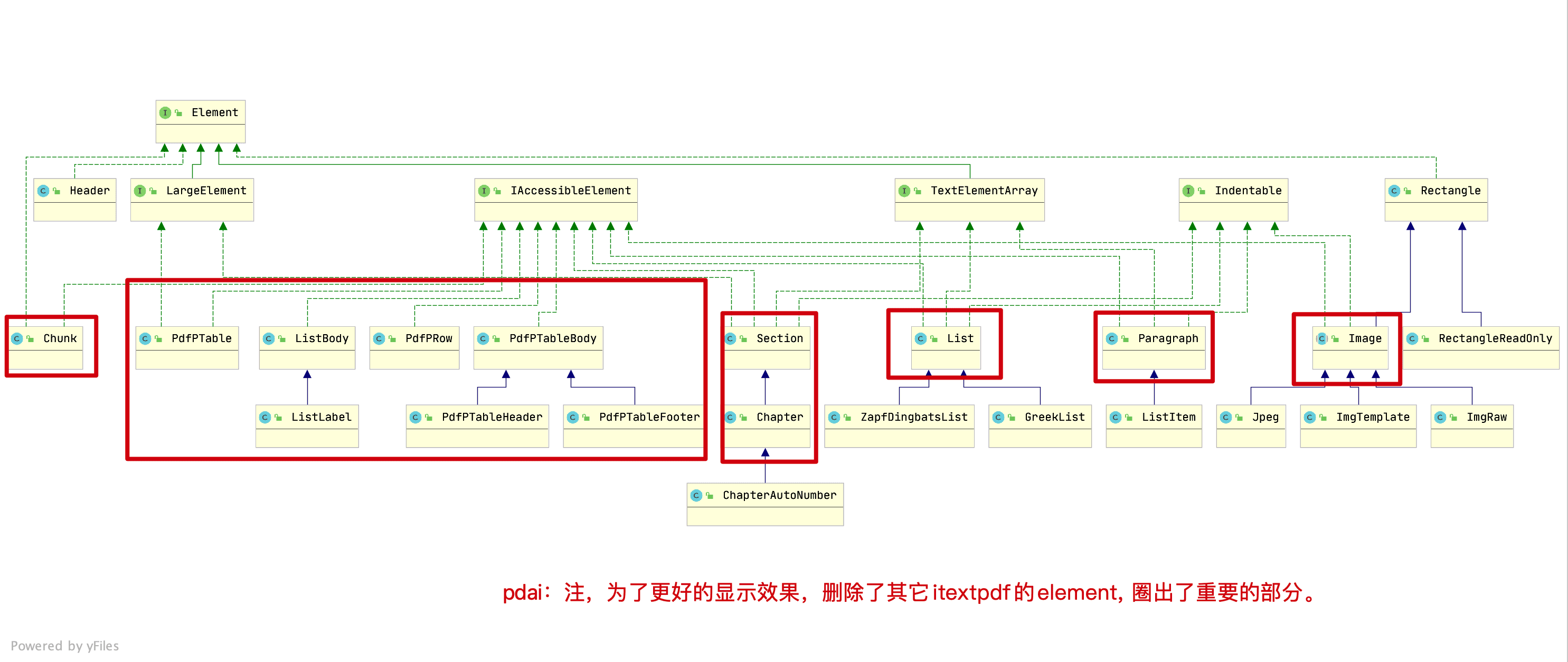
需要说明下如下概念之前的差别:
- Chunk :文档的文本的最小块单位
- Phrase :一系列以特定间距(两行之间的距离)作为参数的块
- Paragraph :段落是一系列块和(或)短句。同短句一样,段落有确定的间距。用户还可以指定缩排;在边和(或)右边保留一定空白,段落可以左对齐、右对齐和居中对齐。添加到文档中的每一个段落将自动另起一行。
(其它从字面上就可以看出,所以这里具体就不做解释了)
实现案例
这里展示SpringBoot集成itext5导出PDF的例子。
Pom依赖
引入poi的依赖包
<dependency>
    <groupId>com.itextpdf</groupId>
    <artifactId>itextpdf</artifactId>
    <version>5.5.13.3</version>
</dependency>
<dependency>
    <groupId>com.itextpdf</groupId>
    <artifactId>itext-asian</artifactId>
    <version>5.2.0</version>
</dependency>导出PDF
UserController中导出的方法
package tech.anarkh.springboot.file.word.poi.controller;


import java.io.OutputStream;

import javax.servlet.http.HttpServletResponse;

import io.swagger.annotations.ApiOperation;
import org.apache.poi.xwpf.usermodel.XWPFDocument;
import org.springframework.beans.factory.annotation.Autowired;
import org.springframework.web.bind.annotation.GetMapping;
import org.springframework.web.bind.annotation.RequestMapping;
import org.springframework.web.bind.annotation.RestController;
import tech.anarkh.springboot.file.word.poi.service.IUserService;


@RestController
@RequestMapping("/user")
public class UserController {

    @Autowired
    private IUserService userService;

    @ApiOperation("Download Word")
    @GetMapping("/word/download")
    public void download(HttpServletResponse response) {
        try {
            XWPFDocument document = userService.generateWordXWPFDocument();
            response.reset();
            response.setContentType("application/vnd.ms-excel");
            response.setHeader("Content-disposition",
                    "attachment;filename=user_world_" + System.currentTimeMillis() + ".docx");
            OutputStream os = response.getOutputStream();
            document.write(os);
            os.close();
        } catch (Exception e) {
            e.printStackTrace();
        }
    }

}UserServiceImple中导出PDF方法
@Override
public Document generateItextPdfDocument(OutputStream os) throws Exception {
Document document = new Document(PageSize.A4);
PdfWriter.getInstance(document, os);
document.open();
document.addAuthor("anarkh");
document.addCreationDate();
document.addTitle("anarkh-pdf-itextpdf");
document.addKeywords("pdf-anarkh-keyword");
document.addCreator("anarkh");
document.add(createTitle("Java 全栈知识体系"));
document.add(createChapterH1("1. 知识准备"));
document.add(createChapterH2("1.1 什么是POI"));
document.add(createParagraph("Apache POI 是创建和维护操作各种符合Office Open XML(OOXML)标准和微软的OLE 2复合文档格式(OLE2)的Java API。用它可以使用Java读取和创建,修改MS Excel文件.而且,还可以使用Java读取和创建MS Word和MSPowerPoint文件。更多请参考[官方文档](https://poi.apache.org/index.html)"));
document.add(createChapterH2("1.2 POI中基础概念"));
document.add(createParagraph("生成xls和xlsx有什么区别?POI对Excel中的对象的封装对应关系?"));
document.add(createChapterH1("2. 实现案例"));
document.add(createChapterH2("2.1 用户列表示例"));
document.add(createParagraph("以导出用户列表为例"));
List<User> userList = getUserList();
PdfPTable table = new PdfPTable(new float[]{20, 40, 50, 40, 40});
table.setTotalWidth(500);
table.setLockedWidth(true);
table.setHorizontalAlignment(Element.ALIGN_CENTER);
table.getDefaultCell().setBorder(1);
for (int i = 0; i < userList.size(); i++) {
table.addCell(createCell(userList.get(i).getId() + ""));
table.addCell(createCell(userList.get(i).getUserName()));
table.addCell(createCell(userList.get(i).getEmail()));
table.addCell(createCell(userList.get(i).getPhoneNumber() + ""));
table.addCell(createCell(userList.get(i).getDescription()));
}
document.add(table);
document.add(createChapterH2("2.2 图片导出示例"));
document.add(createParagraph("以导出图片为例"));
Resource resource = new ClassPathResource("anarkh-guli.png");
Image image = Image.getInstance(resource.getURL());
image.setAlignment(Element.ALIGN_CENTER);
image.scalePercent(60);
document.add(image);
document.close();
return document;
}
private List<User> getUserList() {
List<User> userList = new ArrayList<>();
for (int i = 0; i < 5; i++) {
userList.add(User.builder()
.id(Long.parseLong(i + "")).userName("anarkh" + i).email("anarkh@anarkh.tech" + i).phoneNumber(121231231231L)
.description("hello world" + i)
.build());
}
return userList;
}在实现时可以将如下创建文档内容的方法封装到Util工具类中
private Paragraph createTitle(String content) throws IOException, DocumentException {
    Font font = new Font(getBaseFont(), 24, Font.BOLD);
    Paragraph paragraph = new Paragraph(content, font);
    paragraph.setAlignment(Element.ALIGN_CENTER);
    return paragraph;
}


private Paragraph createChapterH1(String content) throws IOException, DocumentException {
    Font font = new Font(getBaseFont(), 22, Font.BOLD);
    Paragraph paragraph = new Paragraph(content, font);
    paragraph.setAlignment(Element.ALIGN_LEFT);
    return paragraph;
}

private Paragraph createChapterH2(String content) throws IOException, DocumentException {
    Font font = new Font(getBaseFont(), 18, Font.BOLD);
    Paragraph paragraph = new Paragraph(content, font);
    paragraph.setAlignment(Element.ALIGN_LEFT);
    return paragraph;
}

private Paragraph createParagraph(String content) throws IOException, DocumentException {
    Font font = new Font(getBaseFont(), 12, Font.NORMAL);
    Paragraph paragraph = new Paragraph(content, font);
    paragraph.setAlignment(Element.ALIGN_LEFT);
    paragraph.setIndentationLeft(12);
    paragraph.setIndentationRight(12);
    paragraph.setFirstLineIndent(24);
    paragraph.setLeading(20f);
    paragraph.setSpacingBefore(5f);
    paragraph.setSpacingAfter(10f);
    return paragraph;
}

public PdfPCell createCell(String content) throws IOException, DocumentException {
    PdfPCell cell = new PdfPCell();
    cell.setVerticalAlignment(Element.ALIGN_MIDDLE);
    cell.setHorizontalAlignment(Element.ALIGN_CENTER);
    Font font = new Font(getBaseFont(), 12, Font.NORMAL);
    cell.setPhrase(new Phrase(content, font));
    return cell;
}

private BaseFont getBaseFont() throws IOException, DocumentException {
    return BaseFont.createFont("STSong-Light", "UniGB-UCS2-H", BaseFont.NOT_EMBEDDED);
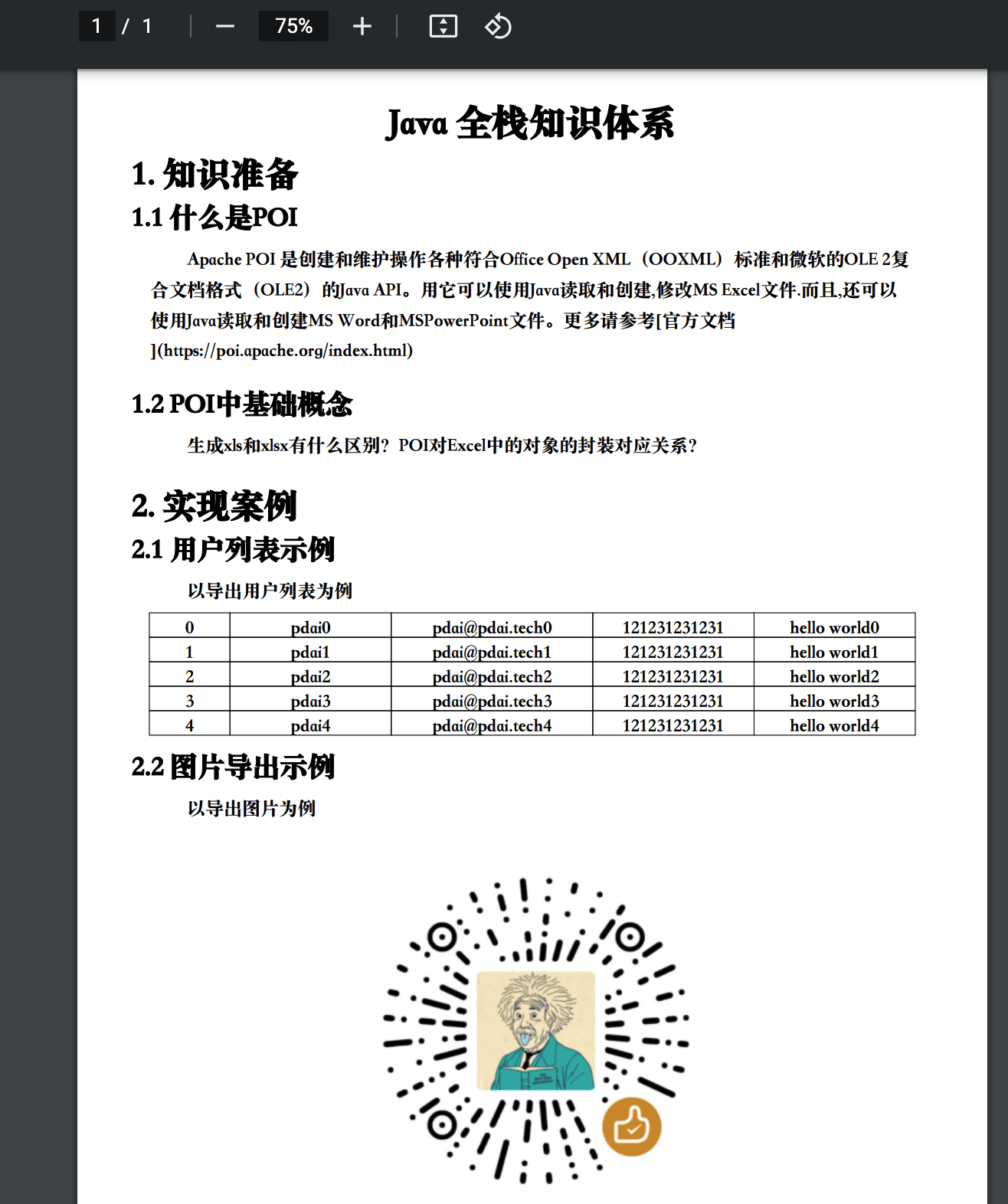
}导出后的PDF
添加页眉页脚和水印
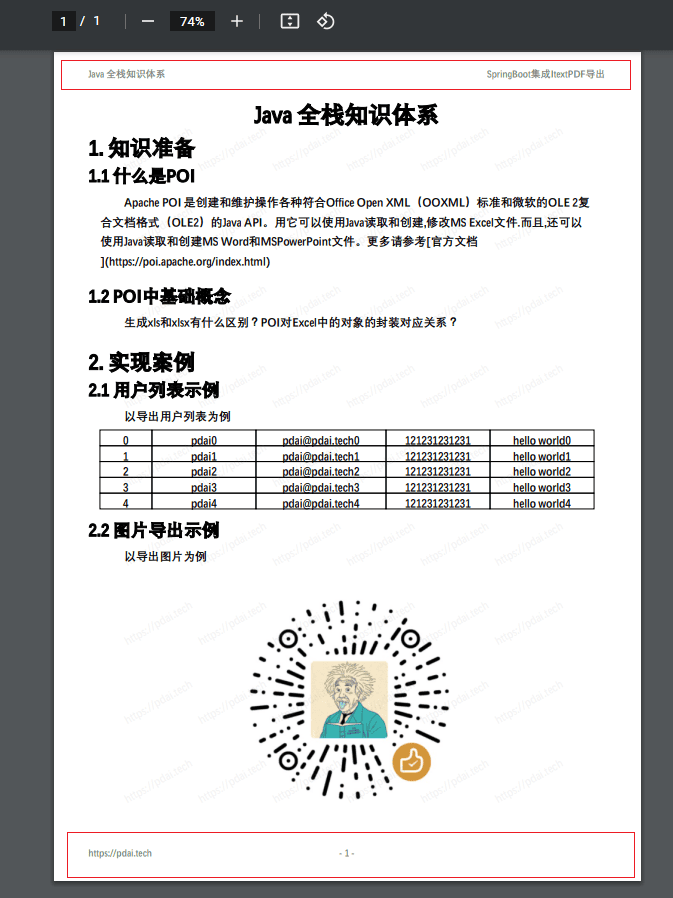
在itextpdf 5.x 中可以利用PdfPageEvent来完成页眉页脚和水印。
package tech.anarkh.springboot.file.pdf.itextpdf.pdf;

import com.itextpdf.text.BaseColor;
import com.itextpdf.text.Document;
import com.itextpdf.text.Element;
import com.itextpdf.text.Phrase;
import com.itextpdf.text.pdf.BaseFont;
import com.itextpdf.text.pdf.ColumnText;
import com.itextpdf.text.pdf.PdfContentByte;
import com.itextpdf.text.pdf.PdfGState;
import com.itextpdf.text.pdf.PdfPageEventHelper;
import com.itextpdf.text.pdf.PdfTemplate;
import com.itextpdf.text.pdf.PdfWriter;


public class MyHeaderFooterPageEventHelper extends PdfPageEventHelper {

    private String headLeftTitle;

    private String headRightTitle;

    private String footerLeft;

    private String waterMark;

    private PdfTemplate total;

    public MyHeaderFooterPageEventHelper(String headLeftTitle, String headRightTitle, String footerLeft, String waterMark) {
        this.headLeftTitle = headLeftTitle;
        this.headRightTitle = headRightTitle;
        this.footerLeft = footerLeft;
        this.waterMark = waterMark;
    }

    @Override
    public void onOpenDocument(PdfWriter writer, Document document) {
        total = writer.getDirectContent().createTemplate(30, 16);
    }

    @Override
    public void onEndPage(PdfWriter writer, Document document) {
        BaseFont bf = null;
        try {
            bf = BaseFont.createFont("STSong-Light", "UniGB-UCS2-H", BaseFont.NOT_EMBEDDED);
        } catch (Exception e) {
            e.printStackTrace();
        }


        addPageHeaderAndFooter(writer, document, bf);


        if (waterMark!=null) {
            addWaterMark(writer, document, bf);
        }
    }

    private void addPageHeaderAndFooter(PdfWriter writer, Document document, BaseFont bf) {
        PdfContentByte cb = writer.getDirectContent();
        cb.saveState();

        cb.beginText();

        cb.setColorFill(BaseColor.GRAY);
        cb.setFontAndSize(bf, 10);


        float x = document.top(-10);
        cb.showTextAligned(PdfContentByte.ALIGN_LEFT,
                headLeftTitle,
                document.left(), x, 0);
        cb.showTextAligned(PdfContentByte.ALIGN_RIGHT,
                headRightTitle,
                document.right(), x, 0);


        float y = document.bottom(-10);
        cb.showTextAligned(PdfContentByte.ALIGN_LEFT,
                footerLeft,
                document.left(), y, 0);
        cb.showTextAligned(PdfContentByte.ALIGN_CENTER,
                String.format("- %d -", writer.getPageNumber()),
                (document.right() + document.left()) / 2,
                y, 0);

        cb.endText();

        cb.restoreState();
    }

    private void addWaterMark(PdfWriter writer, Document document, BaseFont bf) {
        for (int i = 1; i < 7; i++) {
            for (int j = 1; j < 10; j++) {
                PdfContentByte cb = writer.getDirectContent();
                cb.saveState();
                cb.beginText();
                cb.setColorFill(BaseColor.GRAY);
                PdfGState gs = new PdfGState();
                gs.setFillOpacity(0.1f);
                cb.setGState(gs);
                cb.setFontAndSize(bf, 12);
                cb.showTextAligned(Element.ALIGN_MIDDLE, waterMark, 75 * i,
                        80 * j, 30);
                cb.endText();
                cb.restoreState();
            }
        }
    }

    @Override
    public void onCloseDocument(PdfWriter writer, Document document) {
        ColumnText.showTextAligned(total, Element.ALIGN_LEFT, new Phrase(String.valueOf(writer.getPageNumber() - 1)), 2,
                2, 0);
    }
}添加水印后导出后的PDF
进一步理解
通过如下几个问题进一步理解itextpdf。
遇到license问题怎么办
如前文所述,使用itext一定要了解其版本历史和License问题,在早前版本使用的是MPL和LGPL双许可协议 ,在5.x以上版本中使用的是AGPLv3 。 有两种选择:
- 使用2.1.7版本
<dependency>
  <groupId>com.lowagie</groupId>
  <artifactId>itext</artifactId>
  <version>2.1.7</version>
</dependency>- 使用OpenPDF
GitHub上有团队基于itext 4.x版本(MPL和LGPL双许可协议)fork了一个分支成为OpenPDF在新窗口打开,并继续维护该项目。
为何添加页眉页脚和水印是通过PdfPageEvent来完成
为何添加页眉页脚和水印是通过PdfPageEvent来完成?
举个例子,如果我们在上述例子中需要在页脚中显示 “Page 1 of 3", 即总页数怎么办呢?而itext是流模式的写入内容,只有写到最后,才能知道有多少页,那么显示总页数必须在内容写完之后(或者关闭之前)确定;这就是为什么在onEndPage方法时才会写每页的页眉页脚。
iText仅在调用释放模板方法后才将PdfTemplate写入到OutputStream中,否则对象将一直保存在内存中,直到关闭文档。所以我们可以在最后关闭文档前,使用PdfTemplate写入总页码。可以理解成先写个占位符,然后统一替换。
示例源码
https://github.com/realanarkh/tech-anarkh-spring-demos